Coming soon to iPhone
Route it. Watch the weather. Pour it right.
Turn-by-turn navigation with the weather on your route, a heads-up on posted truck limits, trip planning and a full weather center. Plus every additive amount and the slump at the pour for ready-mix drivers. One app. One plan.
- Turn-by-turn voice directions, with the weather on your route
- Heads-up on posted bridge limits, weigh stations, steep grades and sharp curves it knows about
- The weather you'll hit, timed to when you'll be there
- Plan a trip: the best time to leave, with stops and overnights
- Deep weather: future radar, storm tracks, hail, lightning and alerts
- Every additive amount and the slump at the pour, on one screen
One plan. Every feature. $6.99/month.
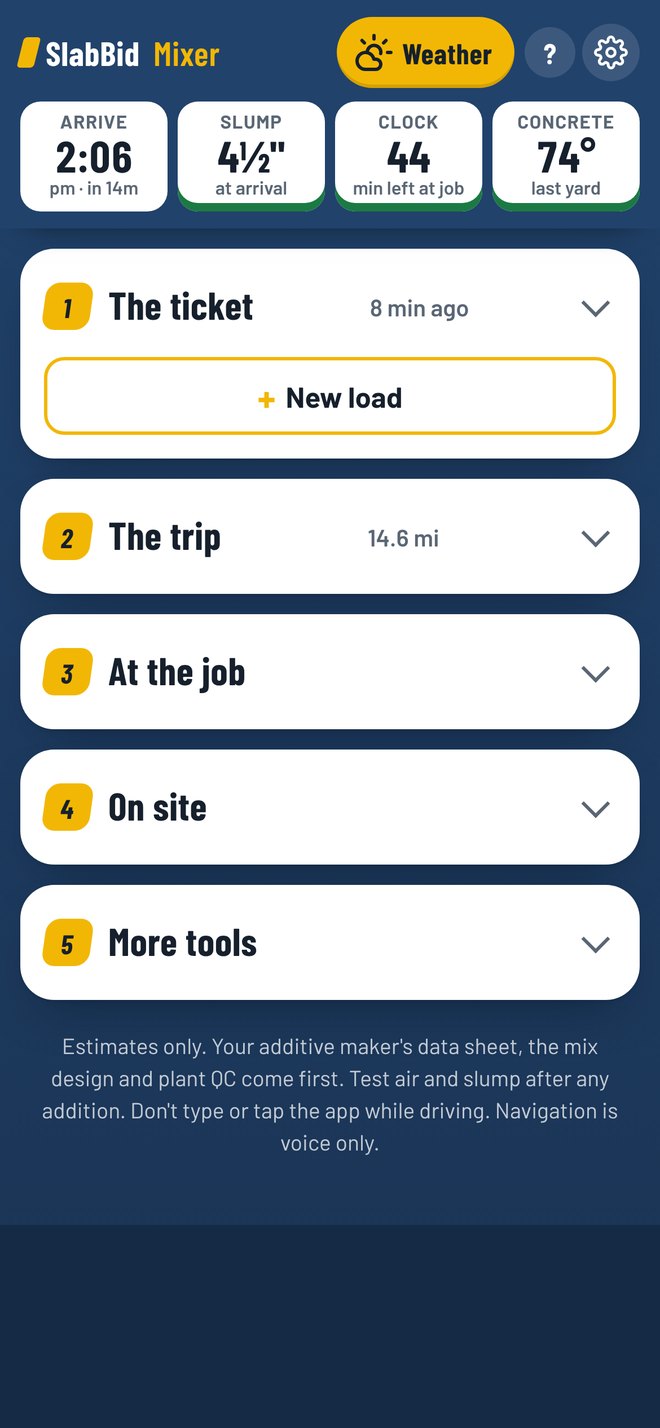
Real app screen. Sample load.
Who it's for
Built for the cab. Any cab.
Made by a ready-mix driver. Set up your truck once and Mixer's warnings fit the rig you drive. No load? It runs as a trip and weather app.
Routes come from Apple Maps, which plans routes for cars. Mixer does not build truck-legal routes and can't promise a route fits your truck. It adds a heads-up about posted limits it knows about. You pick a legal route for your truck, and the posted sign always wins.
Posted-limit warnings
A heads-up on what's posted ahead.
Mixer looks for posted limits it knows about on the road ahead. Warnings show the posted limit, like the sign, and the voice calls them out early.
- Bridges with a posted height or weight limit
- Knows over from under, so a bridge you drive under isn't a weight warning
- Weigh stations in your direction
- Road closures, crashes and work zones from state 511 feeds
- Steep grades from USGS elevation data
- Sharp curves when you're coming in fast
- High wind, set by empty, loaded or towing
- Warnings on the road you're on, even off the route
Warnings come from public data that can be missing, wrong or out of date. No warning does not mean a road is open to your truck.
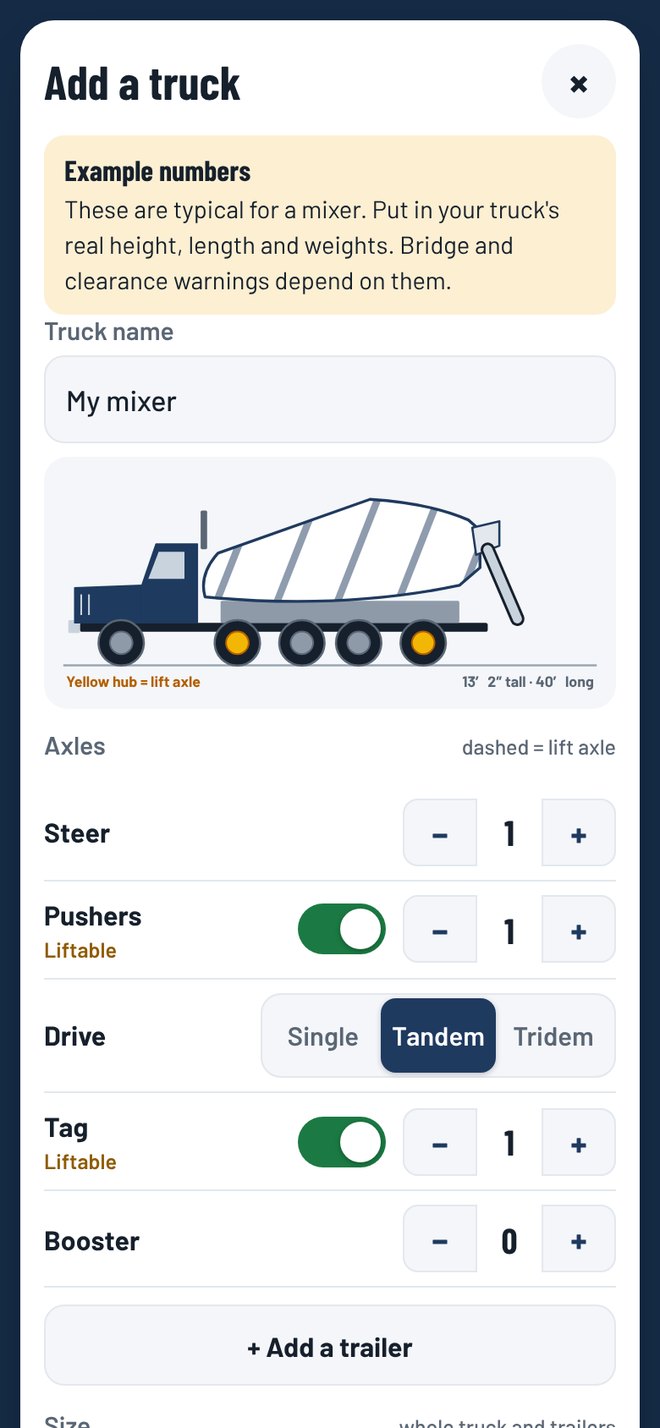
Real app screen: My truck
My truck
Your rig. Your axles.
No two trucks are set up the same. You build your truck once. Its size and weight decide which warnings show.
Any setup
Start from a template or build from scratch. Steer, drive, pusher, tag and booster axles. Mark which ones lift. Up to two trailers.
Your numbers
Height, width, length, empty weight and max gross. Mixers add the yards on the ticket. Other trucks pick Loaded or Empty.
You're in charge
You agree to a short notice before your first truck. You're responsible for your truck's size and weight. Locked while you're moving.
Plan a trip
Know the best time to leave.
Long run or family trip, Mixer drives it ahead of time. It checks every half hour you could leave and the weather wherever you'll be at each hour.
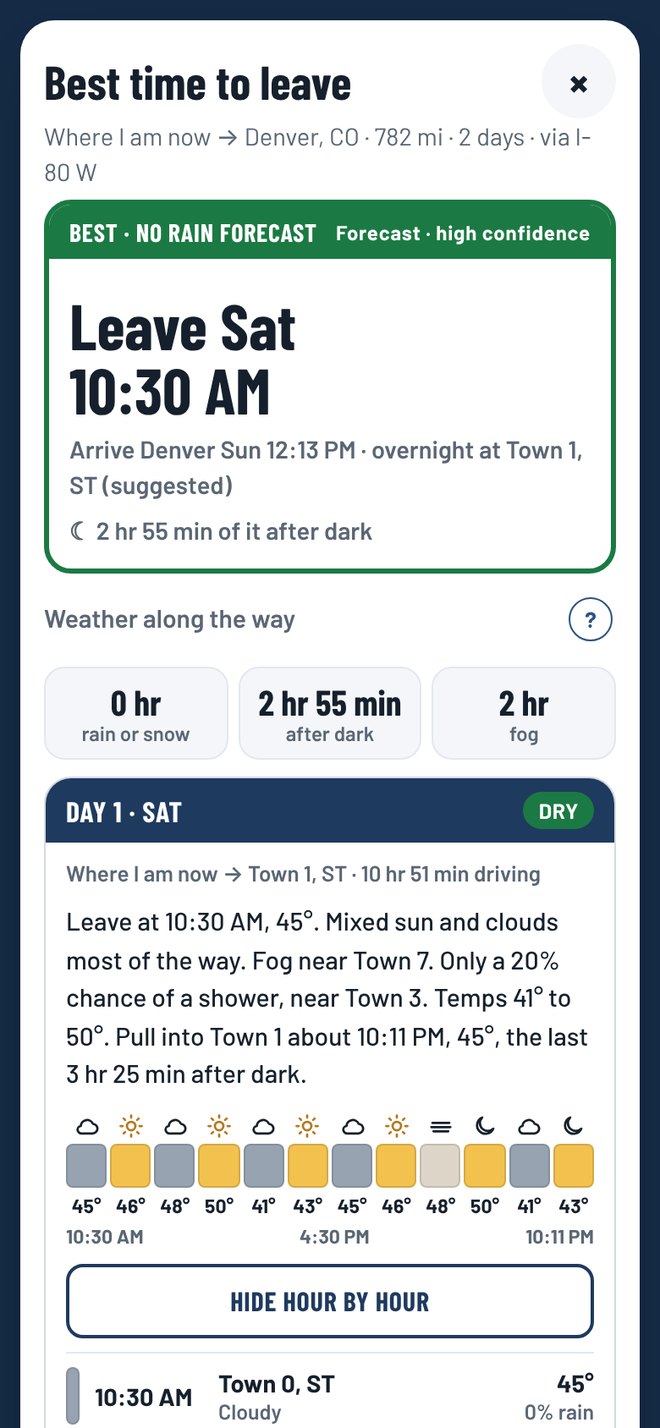
Real app screen: Plan a trip
Best time to leave
Tries every half hour in your window. Ice, snow, storms, rain and wind all count. It won't make you wait half a day to dodge drizzle.
Stops and nights
Fuel stops, repeat stops every few hours, breaks and overnights figured in. A plan, not a logbook.
Compare routes
Up to 3 routes, side by side, with the weather and best leave time on each. See how much is interstate.
Storm maps
Weather Service storm maps for each day of the trip, with your route on them. Tap one to see it full screen.
How to read them
Tap anything in the key. A built-in guide explains fronts, pressure and storm risk levels in plain words.
Your drive hours
Show only the rain and snow for the hours you'll be driving, or the whole day.
Weather Pro
The weather app you'd pay for. Included.
A full weather section with the depth of the paid weather apps. Federal weather data plus Apple Weather, with every reading in inches, feet, miles and mph.
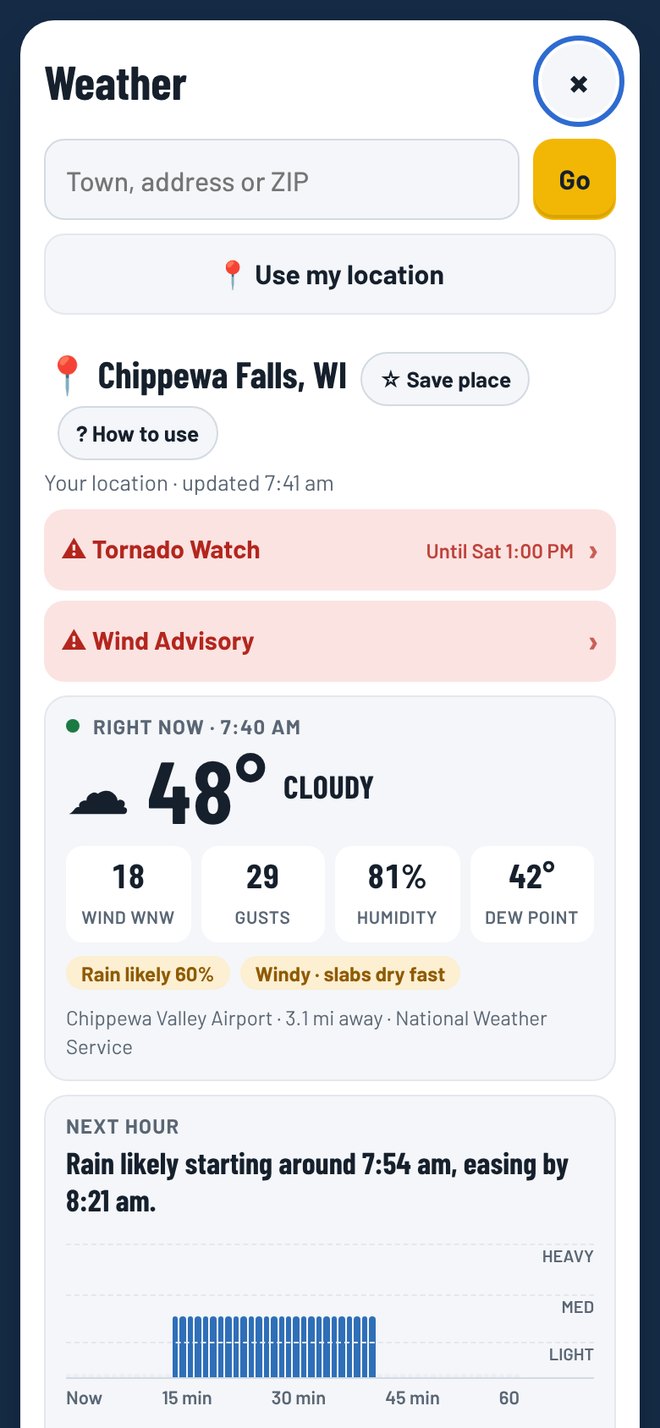
Real app screen. Sample weather.
Future radar
Smooth radar, the past hour on a loop, and future radar out about 2 days.
Storm tracks
Weather Service storm cells, which way they're moving, and when one may reach your place.
Hail and rotation
Hail size, hail swaths, rotation tracks and storm heights from NOAA.
Single-radar views
Reflectivity, velocity, storm-relative velocity, debris and precip type. Storm chaser tools.
Map layers
Radar, temperature, wind flow, satellite and snow depth. Stack lightning, wildfires, hurricanes, smoke and storm reports on top.
Winter driving
Winter driving impact maps for the next 3 days, plus snow, ice and freezing rain on your route.
10-day forecast
Weather Service and Apple blended, with a confidence tag when they don't agree.
Around you
One card shows anything close: lightning, strong storms, wildfires, smoke or a tropical storm.
Alerts
Warned. Even with the app closed.
Mixer watches your plant, your job and where you are. You pick what you want to hear about. Alerts can be late or missed, so keep an eye on the sky too.
- Life-threatening warnings can't be switched off
- Driving advisories: fog, smoke, winter weather, wind and dust
- Tornado, severe storm, flash flood and winter storm watches
- Lightning nearby and rain starting soon
- A strong storm heading your way, with an arrival estimate
- Smoke and air quality
- Tap any alert to read the whole thing
Tomorrow's first-load check
Pick your plant or your job and a time between 5 and 9 pm. You get one alert that evening with tomorrow morning's temps, rain chance and wind, plus the evaporation level at the job. Know before the alarm goes off.
Fast on purpose
Tap it. Paste it. Drive.
Drivers don't have time to fill out forms. The load is one page. Tap in the ticket, drop in the address and roll.
Tap New load
It clears the last load and starts the load clock. Your plant's rates stay put.
Tap in the ticket
Type the yards and slump on the number pad. Tap the bag mix. Tap Full, Half or None for each additive.
Add the address
Paste it, pick a favorite or share a pin from your maps app. The route, weather and posted-limit warnings fill in. Hit Start.

Real app screen. Sample load.
The load
The whole load on one screen.
No tabs. No digging. Tap what's on the ticket and the amounts show up right beside it.
- Air, calcium, water reducers, superplasticizer, retarder and accelerator
- Full, ¾, Half or None. One tap each
- Batch-at slump: what to leave at to hit the ticket slump at the pour
- Slump at arrival, figured for heat, time, the drive and additives
- Load clock: minutes left of 90, or 300 drum turns
- Concrete temp from batch to the last yard out
At the job
Know before you back in.
Mixer checks the job site weather for when you'll get there and tells the finisher what's coming.
- Job weather at arrival: temp, rain chance, wind and humidity
- Evaporation at the job: GO, CAUTION or WARNING
- Heads-up when the concrete may run hot or cold
- Hot and cold load tips based on ACI guides
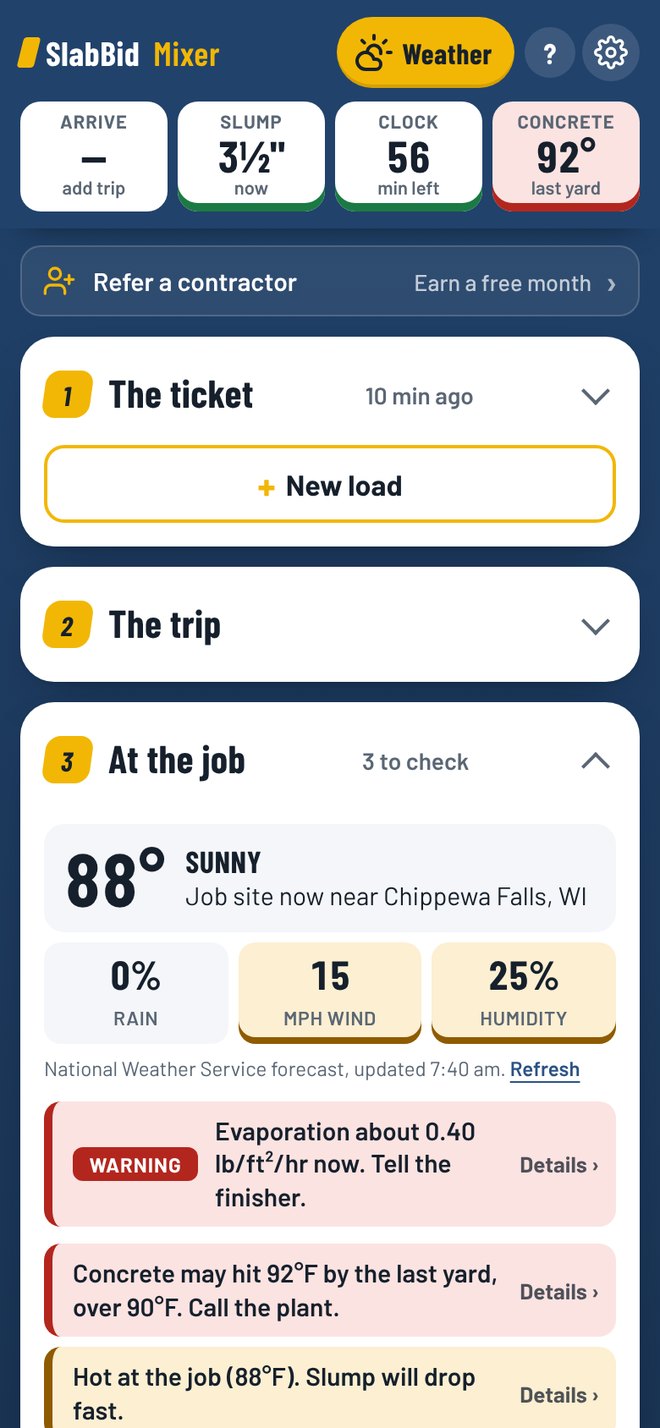
Real app screen. Sample hot day.
On the job
Fix it on site. Keep a record.
Load record PDF
Slump, water added, temps, mix, job weather and up to 6 photos. Share one load or the whole day as a PDF.
Air test low
Type the reading. It tells you how much air entrainer to add first, and to start small.
Needs water
Gallons to hit the slump the crew wants. Checks the ticket limit and the strength you give up.
Plant says add
Told to add 4 oz a yard with 6 yards left? It figures it from what's in the drum now.
Took a test
Type your slump or temp reading. The estimates tune themselves to that load.
Load log
Every load you finish, by day. Who asked for water, what got added on site and your photos.
More tools
Truck weight, yardage to finish the pour, fibers and color, and a unit converter.
Driver guide
Short answers for new drivers. Adding water, balls in the load, weather, washout, truck operation and safety.
Set it once
Your plant. Your numbers.
Put in your plant's data sheet rates one time. Every load uses them. New load clears the ticket and keeps your plant setup.
Product rates
Your plant's full dose for each product. Turn products on or off. Add your own.
Plant address
Routes start at the plant, and Back to plant is one tap after the pour.
Your limits
Hottest concrete allowed, evaporation levels, drum speed and your truck's legal weight.
Pricing
One plan. Every feature.
SlabBid Mixer Truck plan
$6.99/month
The Truck plan has everything on this page. No add-ons, no upgrade to buy later.
Coming soonEverything is included
- Turn-by-turn voice navigation
- Posted-limit warnings: bridges, weigh stations, grades, curves, wind
- My truck profiles for any axle setup
- 511 closures and work zones
- Weather on the route, timed to your drive
- Plan a trip with the best time to leave
- Weather Pro: future radar, storm tracks, hail and more
- Push alerts, plus tomorrow's first-load check
- Every additive amount on one page
- Slump, load clock, concrete temp and evaporation
- Load records and PDFs with photos
- Your plant's own rates, saved on your phone
Good questions
Before you sign up
Who is SlabBid Mixer for?
Ready-mix drivers first. It also works for dump trucks, semis, pickups with trailers and anyone who wants route weather. Leave the load blank and it runs as a trip and weather app.
Is there a cheaper plan without the truck part?
No. There's one plan, the Truck plan, and it has everything on this page.
Is Mixer a truck GPS?
No. Mixer is not a truck-routing GPS. Its directions come from Apple Maps, which plans routes for cars. Mixer adds a heads-up about posted limits it knows about, but it can't promise a route is legal for your truck. If you need truck-legal routing, keep using your truck GPS or your company's routes, and use Mixer for the weather, warnings and load tools.
Where do the warnings come from?
Public data: national bridge records, state 511 feeds, USGS elevation data and map data. That data can be missing, wrong or out of date. Warnings show the posted or listed limit. No warning does not mean a road is open to your truck. You're responsible for your truck's size and weight and for obeying posted signs.
How does the weather on the route work?
It checks the National Weather Service and Apple Weather at spots along your route, for the time you'll pass each one. Radar and nearby weather stations fill in what's happening right now. US only.
Does it replace my plant's dosing chart?
No. It does the math. Your plant's data sheets, the mix design and QC have the final say. Check every number before you add anything.
How good is the slump estimate?
It's an estimate. It counts heat, time, the drive, the weather and the additives. Put in a real slump test and it tunes itself to that load. Always test before you add anything.
Does it work without signal?
The dose math, slump, water and tools work without signal. Directions, the map, warnings and weather need a connection.
Can I use it while driving?
Set up the load and the route before you roll. While you're moving, Mixer allows one tap at a time, like mute or repeat. Everything else waits until you park, or until a passenger taps I'm a passenger.
iPhone or Android?
iPhone first. Android is in the works.
What does it cost?
$6.99/month for the Truck plan, with every feature included.
Coming soon to iPhone.
SlabBid Mixer is in final testing on the road. Look for it on the App Store soon.
Check back here for the App Store link.
SlabBid Mixer gives estimates. Your additive maker's data sheet, the mix design and plant QC govern. Slump, temperature, evaporation, drive time and weather are estimates. Test air and slump after any addition. Mixer is not a truck-routing GPS. Routes come from Apple Maps and are planned for cars. Truck warnings are a helper, not a guarantee: they cover posted limits Mixer knows about, from public data that can be missing, wrong or out of date. No warning does not mean a road is open to your truck. You are responsible for knowing your truck's size and weight and for choosing a legal route. The posted sign always wins. Trip plans are estimates, not hours-of-service records. Obey all traffic laws. Never type in the app while driving.